---
id: 6d6b0014
title: "Landlord and Tenant Billing: Banks, Paying Rent and the Service Fee"
summary: Every bank and sacco rent can be paid into, how a tenant pays rent from their phone step by step, and how a landlord pays their monthly Mkodisha service fee.
audience: Landlords and tenants
order: 14
keywords: billing, pay rent, M-Pesa, STK push, banks, Tuma, service fee, invoice, receipt, wallet, card
updated: 2026-10-23
cover: ../media/billing-tenant-pay-rent.gif
---
# Landlord and Tenant Billing: Banks, Paying Rent and the Service Fee
> **In one sentence:** tenants pay rent from the **Pay Rent** page with an M-Pesa prompt on their phone, the money lands in the landlord's paybill or bank, and landlords pay Mkodisha's monthly fee the same easy way.
## The simple version
There are two kinds of bills in Mkodisha:
1. **Rent**, which a **tenant** pays to their **landlord**.
2. **The Mkodisha service fee**, which a **landlord** pays to **Mkodisha** for using the app. (Tenants never pay Mkodisha anything.)
Both are paid the same way: click **Pay**, type your M-Pesa phone number, and a message pops up on your phone asking for your **M-Pesa PIN**. Type it, and Mkodisha confirms the payment by itself.
## Why Mkodisha does this better
- **Pay from your phone in seconds.** No paybill numbers or account numbers to remember.
- **Money goes where it should.** Rent goes to the landlord's own paybill or bank account, not through someone's pocket.
- **42 banks and saccos supported** for payouts, plus your own M-Pesa paybill or till, and cards.
- **Instant receipts.** The page updates by itself the moment M-Pesa confirms.
- **Part-payments are fine.** Pay some now and the rest later; Mkodisha tracks the balance.
## Where to find it
| What | Who | Link |
|------|-----|------|
| Pay Rent | Tenants | [mkodisha.com/app/pages/calendar](https://mkodisha.com/app/pages/calendar) |
| Receipts | Tenants | [mkodisha.com/app/containers/Pages/Invoices](https://mkodisha.com/app/containers/Pages/Invoices) |
| Billing (service fee, plan, payment methods) | Landlords | [mkodisha.com/app/containers/Pages/Bill](https://mkodisha.com/app/containers/Pages/Bill) (avatar menu → **Billing**) |
| Service bill overview | Landlords | [mkodisha.com/app/containers/Pages/Bill#service-bill-overview](https://mkodisha.com/app/containers/Pages/Bill#service-bill-overview) |
| Account payment options (plan) | Landlords | [mkodisha.com/app/containers/Pages/Bill#account-payment-options](https://mkodisha.com/app/containers/Pages/Bill#account-payment-options) |
## Ways rent can be paid
| Way | How the tenant pays | Where the money goes |
|-----|---------------------|----------------------|
| **Tuma (M-Pesa STK push)** | Clicks Pay in Mkodisha; an M-Pesa PIN prompt pops up on their phone | The landlord's bank or sacco account (list below) |
| **Landlord's own M-Pesa paybill or till** | Pays in Mkodisha (PIN prompt), or straight to the paybill from the M-Pesa menu with their **house number** as the account | The landlord's paybill |
| **Card (Stripe)** | Pays by Visa or Mastercard | The landlord's Stripe account |
| **Cash or bank deposit** | Pays the landlord directly; the landlord records it in Mkodisha | The landlord |
| **Wallet** | Money paid in advance is used on the next invoice automatically | Already with the landlord |
The landlord chooses the way for each building. See [Collecting Payments](collecting-payments.md#step-6-choose-how-tenants-pay-you). Older accounts may still show **Flutterwave** or **Jenga**, which work the same way from the tenant's side.
## Every supported bank and sacco
When a landlord connects a bank through **Tuma**, they pick it from this list. Rent paid by tenants is paid out to that account. This is the list as of 23 October 2026; it updates automatically from Tuma, so the dropdown in the app is always the latest.
| # | Logo | Bank / sacco | Code |
|---|------|--------------|------|
| 1 |  | Absa Bank | `ABSA` |
| 2 |
| Absa Bank | `ABSA` |
| 2 |  | Access Bank | `ACCESS` |
| 3 |
| Access Bank | `ACCESS` |
| 3 |  | Bank of Africa | `BOA` |
| 4 |
| Bank of Africa | `BOA` |
| 4 |  | Bank of Baroda | `BARODA` |
| 5 |
| Bank of Baroda | `BARODA` |
| 5 |  | Caritas Microfinance Bank | `CMFI` |
| 6 |
| Caritas Microfinance Bank | `CMFI` |
| 6 |  | Choice Bank | `CBMFI` |
| 7 |
| Choice Bank | `CBMFI` |
| 7 |  | Cooperative Bank | `COOP` |
| 8 |
| Cooperative Bank | `COOP` |
| 8 |  | Diamond Trust Bank | `DTB` |
| 9 | | DIB Bank | `DIB` |
| 10 |
| Diamond Trust Bank | `DTB` |
| 9 | | DIB Bank | `DIB` |
| 10 |  | Ecobank Savings & Current | `eco` |
| 11 | | Ecobank Xpress | `ecoxpress` |
| 12 |
| Ecobank Savings & Current | `eco` |
| 11 | | Ecobank Xpress | `ecoxpress` |
| 12 |  | Equity Bank | `EQUITY` |
| 13 | | FAMILY | `FML` |
| 14 |
| Equity Bank | `EQUITY` |
| 13 | | FAMILY | `FML` |
| 14 |  | Family Bank | `FAMILY` |
| 15 |
| Family Bank | `FAMILY` |
| 15 |  | Faulu Bank | `FAULU` |
| 16 | | Fortune Sacco | `FORTUNE` |
| 17 |
| Faulu Bank | `FAULU` |
| 16 | | Fortune Sacco | `FORTUNE` |
| 17 |  | HFC Bank | `HFC` |
| 18 |
| HFC Bank | `HFC` |
| 18 |  | I&M Bank | `I&M` |
| 19 | | Imarisha Sacco | `IMR` |
| 20 |
| I&M Bank | `I&M` |
| 19 | | Imarisha Sacco | `IMR` |
| 20 |  | In-House M-PESA Business Paybill | `PAYBILL` |
| 21 | | In-House M-PESA Business Till Number | `BUYGOODS` |
| 22 |
| In-House M-PESA Business Paybill | `PAYBILL` |
| 21 | | In-House M-PESA Business Till Number | `BUYGOODS` |
| 22 |  | K Unity Sacco | `KUS` |
| 23 |
| K Unity Sacco | `KUS` |
| 23 |  | Kenya Commercial Bank | `KCB` |
| 24 |
| Kenya Commercial Bank | `KCB` |
| 24 |  | Kenya Women Finance Trust | `KWFT` |
| 25 |
| Kenya Women Finance Trust | `KWFT` |
| 25 |  | Kingdom Bank | `KGB` |
| 26 |
| Kingdom Bank | `KGB` |
| 26 |  | LOOP BUSINESS | `LOOPB` |
| 27 | | LOOP C2B | `LOOPC` |
| 28 |
| LOOP BUSINESS | `LOOPB` |
| 27 | | LOOP C2B | `LOOPC` |
| 28 |  | MIDDLE EAST BANK | `MEB` |
| 29 |
| MIDDLE EAST BANK | `MEB` |
| 29 |  | National Bank of Kenya | `NBK` |
| 30 |
| National Bank of Kenya | `NBK` |
| 30 |  | NCBA Bank | `NCBA` |
| 31 |
| NCBA Bank | `NCBA` |
| 31 |  | Post Bank | `POSTBANK` |
| 32 |
| Post Bank | `POSTBANK` |
| 32 |  | Premier Bank Kenya | `PBK` |
| 33 |
| Premier Bank Kenya | `PBK` |
| 33 |  | Prime Bank | `PRIME` |
| 34 |
| Prime Bank | `PRIME` |
| 34 |  | SBM Bank Kenya | `SBM` |
| 35 |
| SBM Bank Kenya | `SBM` |
| 35 |  | Sidian Bank | `SIDIAN` |
| 36 | | Spire Bank | `SPR` |
| 37 |
| Sidian Bank | `SIDIAN` |
| 36 | | Spire Bank | `SPR` |
| 37 |  | Stanbic Bank | `STANBIC` |
| 38 |
| Stanbic Bank | `STANBIC` |
| 38 |  | Standard Chartered Bank | `SCB` |
| 39 |
| Standard Chartered Bank | `SCB` |
| 39 |  | Tower Sacco Society | `TSS` |
| 40 |
| Tower Sacco Society | `TSS` |
| 40 |  | Unaitas | `UNTS` |
| 41 | | Unaitas Sacco | `UNTSAC` |
| 42 |
| Unaitas | `UNTS` |
| 41 | | Unaitas Sacco | `UNTSAC` |
| 42 |  | Zemo Pay | `Zemo` |
Also supported for receiving payments:
| | Method |
|---|--------|
|
| Zemo Pay | `Zemo` |
Also supported for receiving payments:
| | Method |
|---|--------|
|  | **M-Pesa**: your own paybill or till number (monitored by Mkodisha) |
| | **M-Pesa Business**: in-house paybill or till through Tuma |
|
| **M-Pesa**: your own paybill or till number (monitored by Mkodisha) |
| | **M-Pesa Business**: in-house paybill or till through Tuma |
|  | **Stripe**: card payments |
## How a tenant pays rent (step by step)
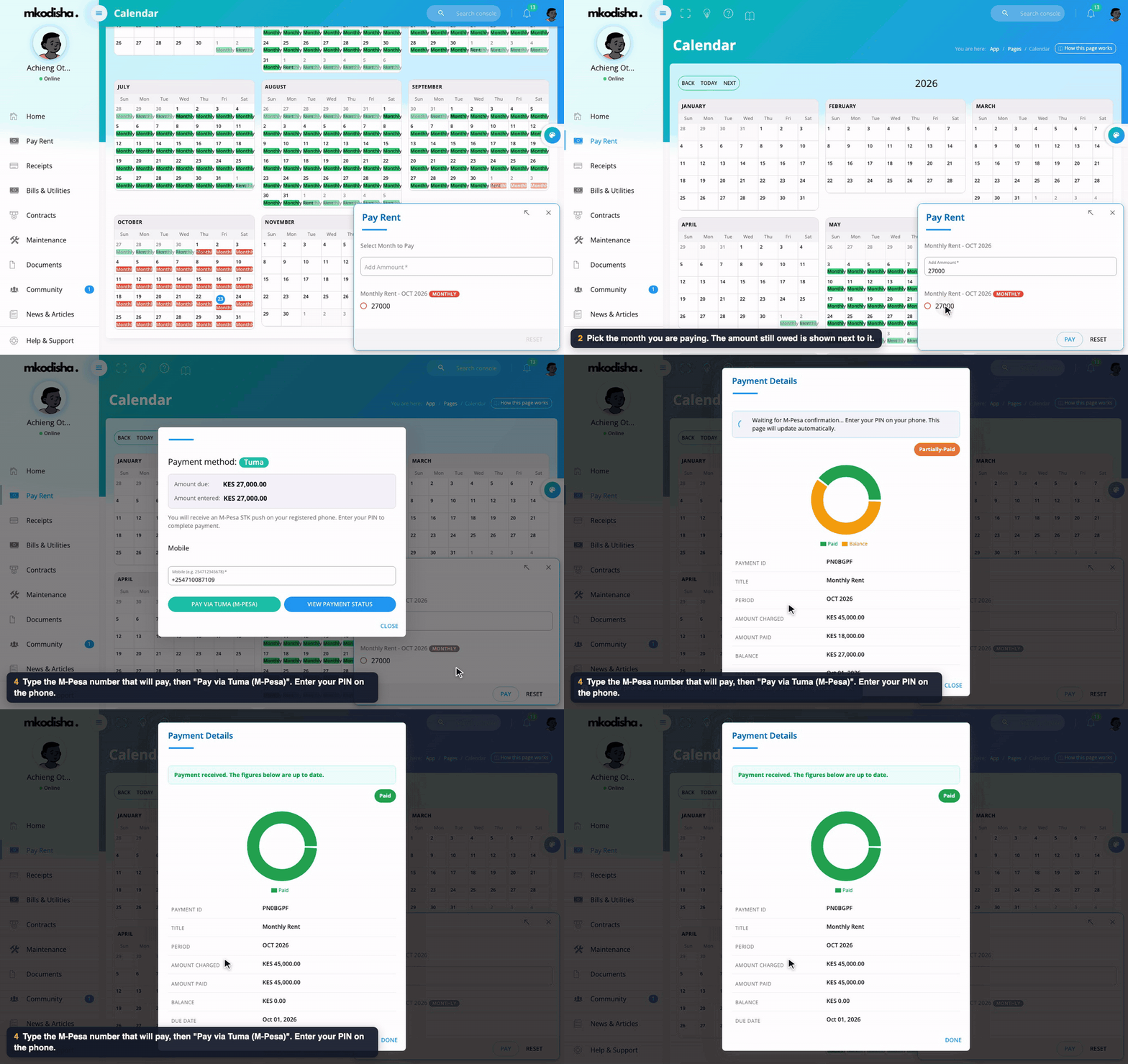
1. Open **Pay Rent** in the menu. The calendar shows each month's rent.
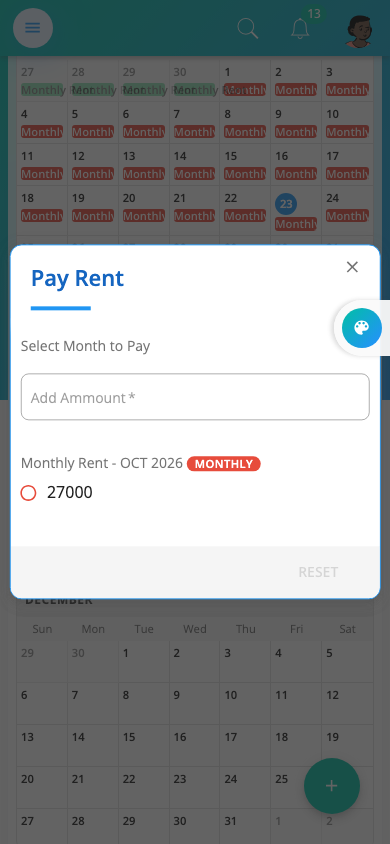
2. Click **Pay Rent**. A box opens listing every month that still has money owing, with the amount next to it (for example *Monthly Rent – OCT 2026: 27000*).
3. Click the month. The amount fills in. Change it if you want to pay only part.
4. Click **Pay**. You see the **payment method** (for example *Tuma*), the **amount due** and the **amount entered**.
5. Type the M-Pesa number that will pay, like `254712345678`.
6. Click **Pay via Tuma (M-Pesa)** (or **Pay** for an M-Pesa paybill).
7. **Look at your phone.** An M-Pesa message asks for your PIN. Type it and press OK.
8. Mkodisha shows *Waiting for M-Pesa confirmation… This page will update automatically*, then **Payment received**, with the invoice now **Paid**.
Your receipt is ready under **Receipts**, and your landlord sees the payment straight away.
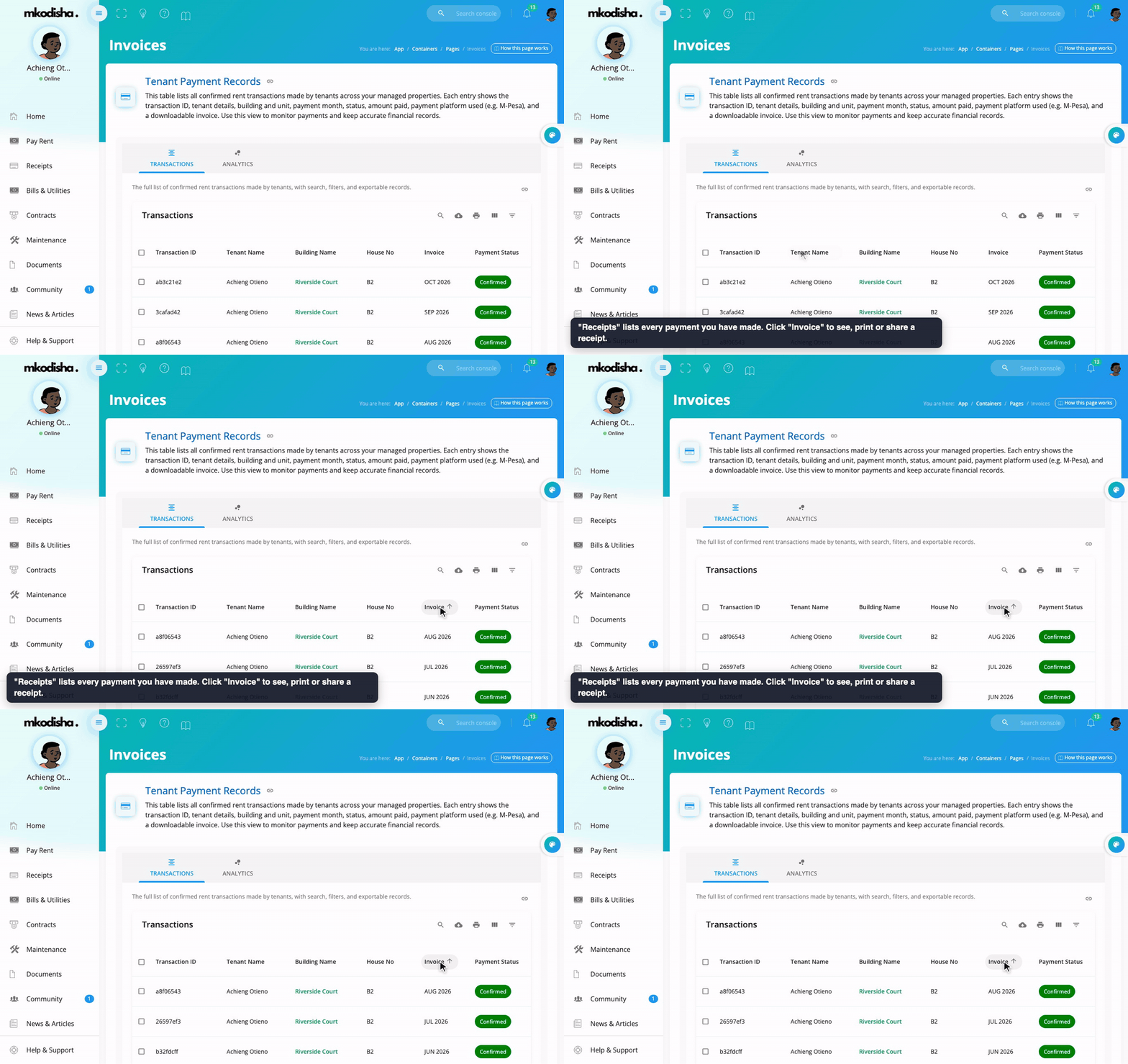
> **Paying straight to the paybill?** Use the M-Pesa menu as usual and type your **house number** (for example `B2`) as the account number. Mkodisha matches it to your rent automatically.
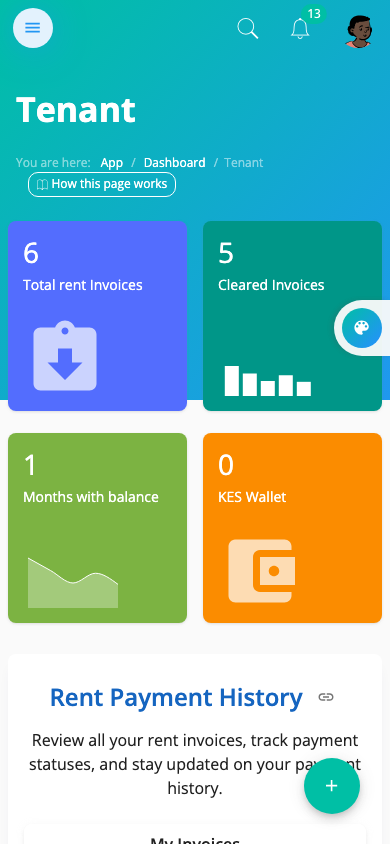
**On a phone**, it looks like this:
| Home | Pay Rent |
|------|----------|
|  |  |
## How a landlord pays the Mkodisha service fee
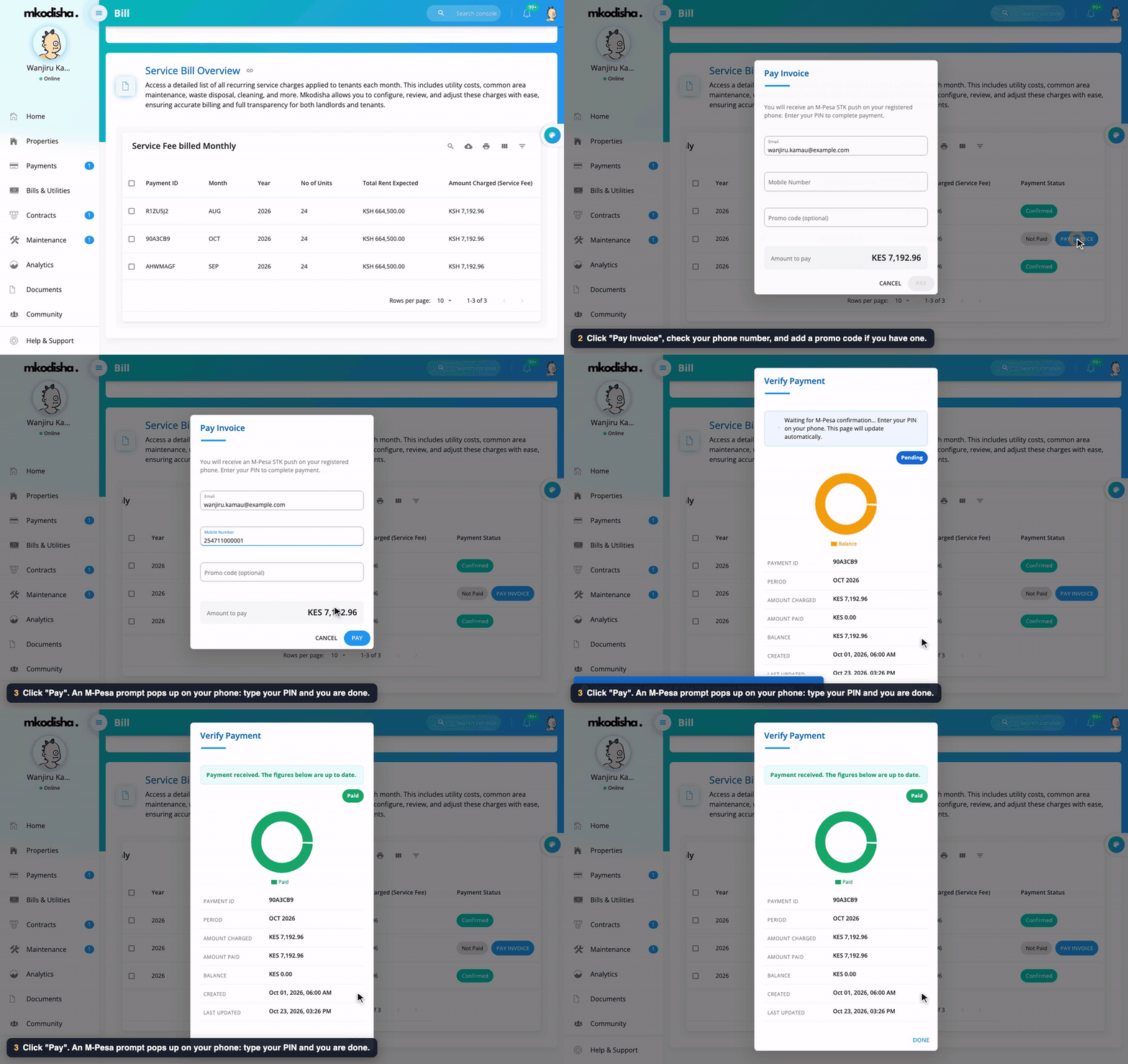
1. Click your picture at the top right → **Billing**.
2. Scroll to **Service Bill Overview**. On the 1st of each month Mkodisha adds that month's invoice, showing the number of units, the total rent expected and the **amount charged (service fee)**. You also get an email.
3. On the unpaid month (**Not Paid**), click **Pay Invoice**.
4. Check your email, type your **mobile number**, and add a **promo code** if you have one; the **amount to pay** updates.
5. Click **Pay**, then type your M-Pesa PIN on your phone.
6. Mkodisha shows *Waiting for M-Pesa confirmation*, then **Payment received**. The invoice turns **Confirmed**, and your plan shows **Active**.
### Paying by card every month instead
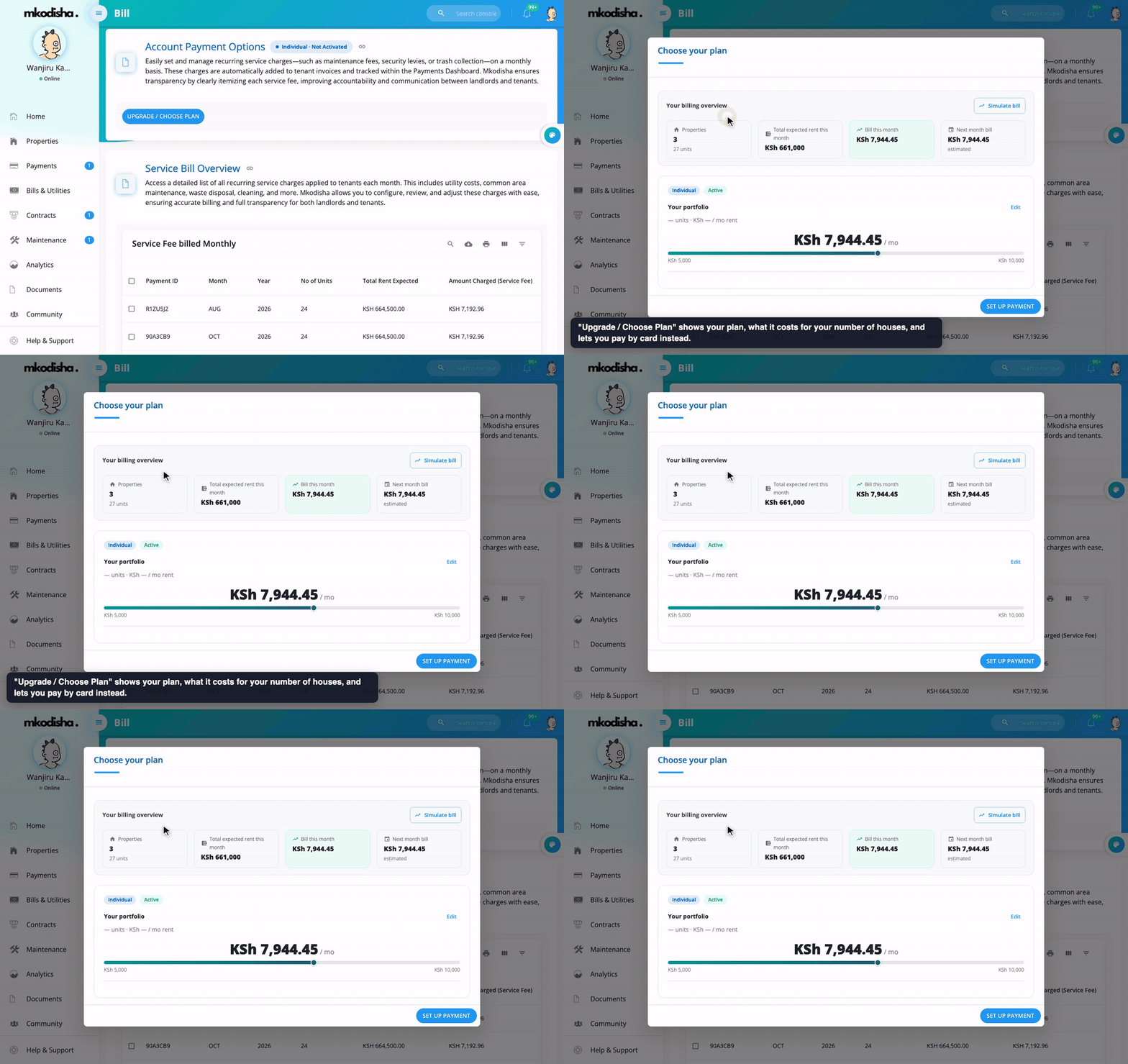
Under **Account Payment Options**, click **Upgrade / Choose Plan**. You'll see your billing overview (properties, units, expected rent, this month's bill and next month's estimate) and your plan. **Set up payment** saves a card, and Mkodisha then charges it automatically on the 1st of each month. How the amount is worked out is explained in [How Mkodisha Pricing Works](pricing.md).
## Quick answers
**Do tenants pay Mkodisha anything?**
No. Tenants only pay their rent and bills to their landlord.
**Which banks can rent be paid into?**
The 42 banks and saccos above (through Tuma), your own M-Pesa paybill or till, or Stripe for cards.
**The M-Pesa prompt didn't appear on my phone.**
Check the number starts with 254 and that your phone is on and unlocked, then try again. If it still doesn't come, pay straight to the paybill with your house number as the account.
**Can I pay only part of my rent?**
Yes. Change the amount before you click Pay. The rest stays on your invoice.
**I paid too much.**
The extra pays your newest unpaid invoice, and anything left goes to your wallet for next month.
**When is the landlord's service fee charged?**
An invoice is created on the 1st of each month for landlords on the Individual or Business plan. Free-plan landlords don't get one.
**Where is my receipt?**
Tenants: **Receipts** in the menu. Landlords: **Billing → Service Bill Overview**.
## Words to know
| Word | Meaning |
|------|---------|
| STK push | The M-Pesa PIN prompt that pops up on your phone |
| Paybill / till | M-Pesa business numbers that receive money |
| Tuma | The payment partner that sends STK pushes and pays out to banks |
| Service fee | What a landlord pays Mkodisha each month |
| Promo code | A code that gives a discount on the service fee |
| Wallet | Money paid in advance, used on the next invoice |
## Videos
[](https://www.youtube.com/watch?v=WwncJsC9WhE)
[](https://www.youtube.com/watch?v=oWkTg-ZlWy8)
## Related guides
- [Collecting Payments, Invoices and Active Bills](collecting-payments.md)
- [How Mkodisha Pricing Works](pricing.md)
- [Bills and Utilities](bills-and-utilities.md)
- [Landlord and Tenant Dashboards](dashboards.md)
| **Stripe**: card payments |
## How a tenant pays rent (step by step)

1. Open **Pay Rent** in the menu. The calendar shows each month's rent.
2. Click **Pay Rent**. A box opens listing every month that still has money owing, with the amount next to it (for example *Monthly Rent – OCT 2026: 27000*).
3. Click the month. The amount fills in. Change it if you want to pay only part.
4. Click **Pay**. You see the **payment method** (for example *Tuma*), the **amount due** and the **amount entered**.
5. Type the M-Pesa number that will pay, like `254712345678`.
6. Click **Pay via Tuma (M-Pesa)** (or **Pay** for an M-Pesa paybill).
7. **Look at your phone.** An M-Pesa message asks for your PIN. Type it and press OK.
8. Mkodisha shows *Waiting for M-Pesa confirmation… This page will update automatically*, then **Payment received**, with the invoice now **Paid**.
Your receipt is ready under **Receipts**, and your landlord sees the payment straight away.

> **Paying straight to the paybill?** Use the M-Pesa menu as usual and type your **house number** (for example `B2`) as the account number. Mkodisha matches it to your rent automatically.
**On a phone**, it looks like this:
| Home | Pay Rent |
|------|----------|
|  |  |
## How a landlord pays the Mkodisha service fee

1. Click your picture at the top right → **Billing**.
2. Scroll to **Service Bill Overview**. On the 1st of each month Mkodisha adds that month's invoice, showing the number of units, the total rent expected and the **amount charged (service fee)**. You also get an email.
3. On the unpaid month (**Not Paid**), click **Pay Invoice**.
4. Check your email, type your **mobile number**, and add a **promo code** if you have one; the **amount to pay** updates.
5. Click **Pay**, then type your M-Pesa PIN on your phone.
6. Mkodisha shows *Waiting for M-Pesa confirmation*, then **Payment received**. The invoice turns **Confirmed**, and your plan shows **Active**.
### Paying by card every month instead

Under **Account Payment Options**, click **Upgrade / Choose Plan**. You'll see your billing overview (properties, units, expected rent, this month's bill and next month's estimate) and your plan. **Set up payment** saves a card, and Mkodisha then charges it automatically on the 1st of each month. How the amount is worked out is explained in [How Mkodisha Pricing Works](pricing.md).
## Quick answers
**Do tenants pay Mkodisha anything?**
No. Tenants only pay their rent and bills to their landlord.
**Which banks can rent be paid into?**
The 42 banks and saccos above (through Tuma), your own M-Pesa paybill or till, or Stripe for cards.
**The M-Pesa prompt didn't appear on my phone.**
Check the number starts with 254 and that your phone is on and unlocked, then try again. If it still doesn't come, pay straight to the paybill with your house number as the account.
**Can I pay only part of my rent?**
Yes. Change the amount before you click Pay. The rest stays on your invoice.
**I paid too much.**
The extra pays your newest unpaid invoice, and anything left goes to your wallet for next month.
**When is the landlord's service fee charged?**
An invoice is created on the 1st of each month for landlords on the Individual or Business plan. Free-plan landlords don't get one.
**Where is my receipt?**
Tenants: **Receipts** in the menu. Landlords: **Billing → Service Bill Overview**.
## Words to know
| Word | Meaning |
|------|---------|
| STK push | The M-Pesa PIN prompt that pops up on your phone |
| Paybill / till | M-Pesa business numbers that receive money |
| Tuma | The payment partner that sends STK pushes and pays out to banks |
| Service fee | What a landlord pays Mkodisha each month |
| Promo code | A code that gives a discount on the service fee |
| Wallet | Money paid in advance, used on the next invoice |
## Videos
[](https://www.youtube.com/watch?v=WwncJsC9WhE)
[](https://www.youtube.com/watch?v=oWkTg-ZlWy8)
## Related guides
- [Collecting Payments, Invoices and Active Bills](collecting-payments.md)
- [How Mkodisha Pricing Works](pricing.md)
- [Bills and Utilities](bills-and-utilities.md)
- [Landlord and Tenant Dashboards](dashboards.md)